Headerly: Lightweight Chrome extension for on-the-fly header testing
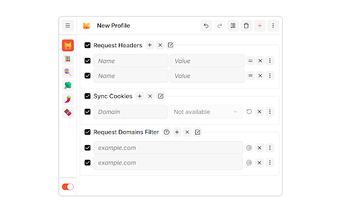
Headerly, built by its developer for the developer community, is a Chrome extension for on-the-fly HTTP header editing. It lets users add, edit, or remove request headers to simulate clients and test API authentication, making repetitive header changes faster than manual DevTools edits. The extension offers rule toggles, domain-scoped rules, and a minimalist interface for quick configuration. Web developers, QA engineers, and security researchers gain a compact browser-integrated utility for network-level debugging and targeted request testing.
What is Headerly used for?
Headerly modifies outgoing HTTP request headers directly in the browser, enabling targeted testing and debugging of web applications. Developers and security testers can add custom headers, edit existing ones, or remove headers to simulate restricted clients and to test API authentication flows such as adding Bearer tokens. This makes it suitable for rapid iteration during front-end development, QA scenarios that require varied request metadata, and security checks focused on server-side header handling.
How does Headerly behave under repetitive testing?
The extension prioritizes a minimal setup and direct browser integration, so creating and toggling rules is faster than repeating manual edits in DevTools. Users can enable or disable rules globally or individually, reducing setup time for repeated test cases. Headerly intentionally limits itself to header manipulation, which keeps the user interface small and the workflow concise compared with full-featured proxy suites that require separate network configuration.
Does Headerly transmit browsing data or affect privacy?
The extension applies rule changes locally within the browser and typically does not send personal browsing history to external servers. Domain-scoped rules let users confine header changes to specific URLs or hosts, which reduces unintended modification outside test targets. Despite operating locally, Headerly does not replace network-level logging; testers should corroborate header effects with server logs or packet captures when auditing security-sensitive flows.
Does Headerly integrate with other browsers and developer workflows?
As a Chrome extension it runs on Chromium-based browsers including Edge, Brave, and Vivaldi, so teams using those browsers can reuse rule sets without extra tooling. Headerly is not a replacement for proxy-based debugging when full request and response inspection is required. For most browser-centric tasks it pairs well with existing DevTools and automated test frameworks that generate HTTP traffic from the browser.
Who should choose Headerly?
Headerly is a practical choice for web developers, QA engineers, and security researchers who need fast, browser-integrated header edits during iterative testing. It does not aim to replace proxy suites that capture full request and response bodies, so teams requiring deep packet inspection should pair it with dedicated network tooling. A simple practice is to verify Headerly-driven tests with server logs or packet captures to confirm observed behavior.
Pros
Add, edit, and remove HTTP request headers directly in the browser
Enable or disable rules globally or per domain for targeted tests
Works on Chromium-based browsers such as Edge, Brave, and Vivaldi
Cons
Does not provide full request and response inspection like proxy suites
Header-focused scope limits use for body-level debugging workflows
Laws concerning the use of this software vary from country to country. We do not encourage or condone the use of this program if it is in violation of these laws. Softonic may receive a referral fee if you click or buy any of the products featured here.